TechTurco WhatsApp ChannelOne-way channel: your number stays private
Social Media
New Contacts tab in WhatsApp Android beta: Online users gathered on a single screen
The Contacts tab tested by instant messaging app WhatsApp combines favorites, recently active users, and Meta AI access into a single spot on the bottom navigation bar.

WhatsApp is introducing new features on both Android and iOS. The upcoming feature replaces the Communities section in the Android beta version, allowing users to see online contacts at the top of the list with a green dot indicator.
WhatsApp is changing the tabs in the bottom navigation bar of its Android app. The company has started testing a new Contacts tab that allows users to manage contacts in their address book and track online accounts from a single page. The new section replaces the Communities tab in the current interface.

First spotted in Android beta version 2.26.40.3, this change became available to a limited number of testers with beta version 2.26.45.2 distributed via Google Play Store. The new interface is designed to provide direct access to recently active contacts without scrolling up or down in the chat window.
Reklam

How does the Contacts tab work?
Accounts marked as favorites by users are located at the top of the tab. This section allows opening a chat window quickly by reaching pinned contacts with a single tap. Directly below favorites, the entire saved contact list is displayed.
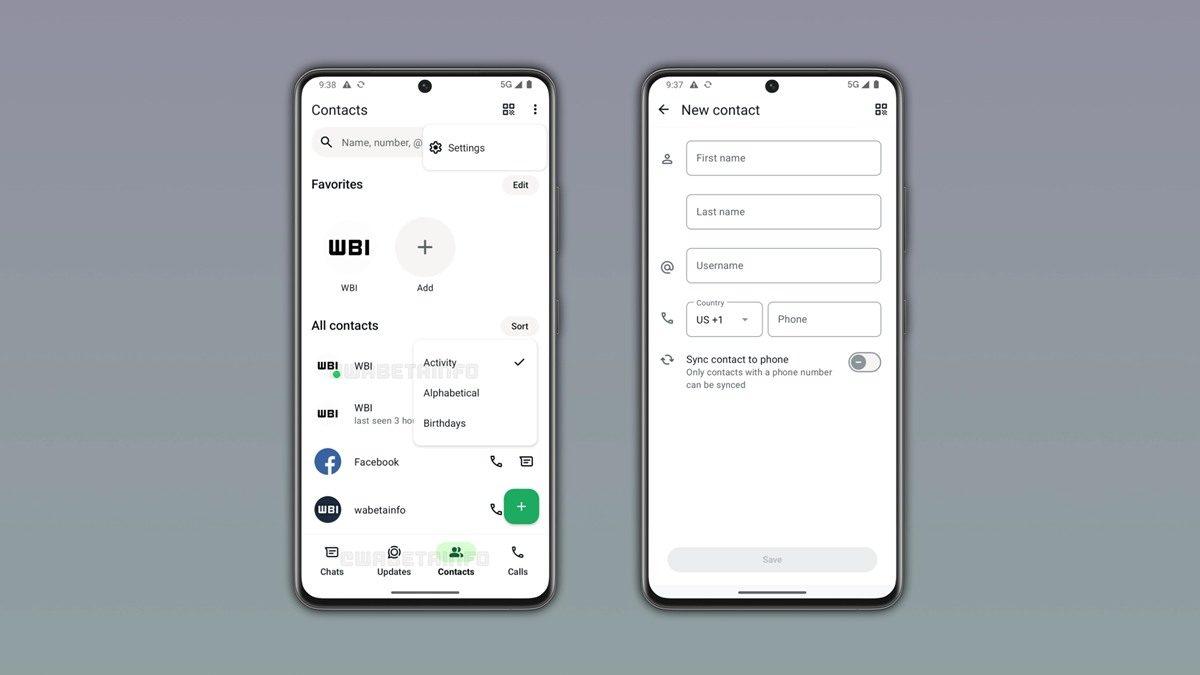
Three different sorting options are offered for the contact list:
When activity is selected as the sorting criteria, accounts currently online appear at the top of the list with a green dot indicator. Contacts who are not online at that moment are listed below based on their last seen timestamps, subject to privacy permissions.
Reklam
Be the first to know
Join our channel and get key developments straight on your phone.
TechTurco Telegram ChannelMute or leave any time
Meta AI integration and new contact saving options
A shortcut to start a Meta AI chat is located at the bottom of the contact list. Because the artificial intelligence (AI) assistant is continuously accessible, a permanent green status dot is shown on its icon. This section also includes options to send invite links to other applications and invite Instagram followers to WhatsApp chats.
Users who want to add a new number or account to contacts use the floating action button in the bottom right corner of the interface. The registration form that opens includes first name, last name, username, and phone number fields. Synchronization with the device's own phone book continues; however, WhatsApp transfers only contacts with a defined phone number directly to the device's address book.
Reklam
This article was translated from Turkish. Read the original article in Turkish.
More in Social Media