KB5127936 released for Windows 11: Right-click menu completely overhauled
Microsoft has officially rolled out the change highly requested by Windows 11 users. Update KB5127936 completely revamps a feature that received many complaints.
Microsoft has managed to win users' hearts with its recent Windows 11 updates. 26H2, one of the most notable versions of the year, pleased everyone both in terms of design and RAM usage. Now, the software giant listened to another problem of users and introduced another update. The Windows 11 KB5127936 update revamps the heavily complained about section from top to bottom.
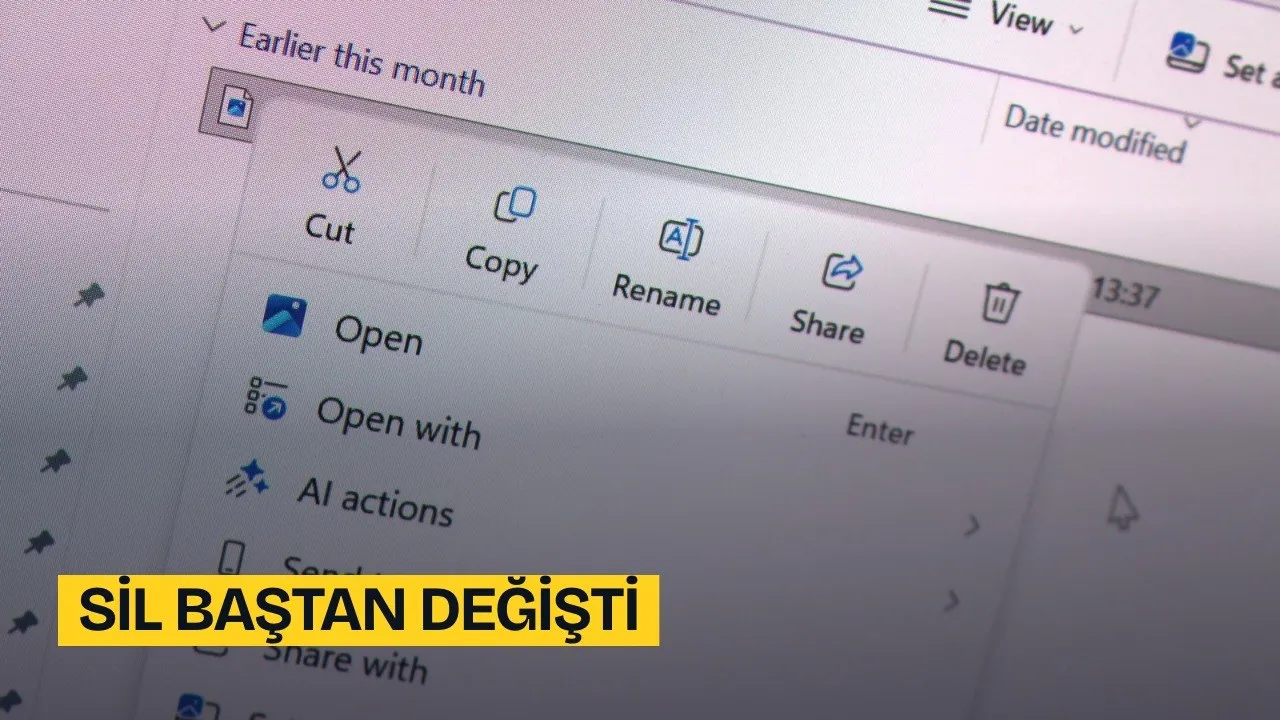
For those who don't know, the recently released Windows 11 KB5127936 update brings radical changes to the right-click (context) menu, which is one of the most criticized components of the system.
RIGHT-CLICK MENU REBUILT FROM SCRATCH
The right-click menu, which Windows 11 users have complained about for years due to slowness, complexity, and disorganization, gains both a significant performance boost and takes on a customizable structure with this update.
Improvements Coming with Project Windows K2
The comprehensive change in the right-click menu actually stands out as part of the "Windows K2" project, where Microsoft focuses on resolving the core issues of the operating system and user feedback. Indeed, the company included the following statements in its announcement regarding the new update:
"This update offers a refreshed right-click menu that is faster, simpler, and more customizable. While the renewed menu opens much faster, it reduces clutter and gives you more control over the commands and app extensions that appear when you right-click."
Which Customization Options Came to the Right-Click Menu?
With the new update, users will be able to shape the right-click menu according to their own usage habits. The customization capabilities within the scope of the KB5127936 update are listed as follows:
- Managing built-in commands: Default Windows commands such as "Send to" and "Create shortcut" can be optionally turned off or on.
- Adding new commands: Functional commands such as "Print" can be directly included in the menu.
- Controlling app extensions: Users can choose whether app extensions appear in the main menu or in a submenu, or the submenu can be hidden completely.
- Vertical list layout instead of icons: Cut, Copy, Paste, Rename, Delete, and Share functions can be displayed as text directly in a vertical list instead of the horizontal row of icons at the top of the menu.
- Location of the Properties option: The "Properties" option can be moved to the very bottom of the menu.
Especially being able to revert basic commands such as Cut, Copy, and Paste back to a vertical text list instead of horizontal icons provides convenience for users accustomed to the Windows 10 layout. In addition, the visibility of third-party apps taking up unnecessary space in the menu can also be turned off.
Xbox Task View, File Explorer, and Settings Updated
The KB5127936 update is not limited to just the right-click menu. With the released package, while the new Xbox task view interface meets users, various updates are also offered in the File Explorer and Windows Settings sections.
How to Install the Update?
The KB5127936 update has started rolling out gradually. Users who want to receive the update faster need to enable the "Get the latest updates as soon as they're available" option in Windows Settings. However, even if this setting is turned on, it may take some time for the features to be assigned to your device.
This article was translated from Turkish. Read the original article in Turkish.