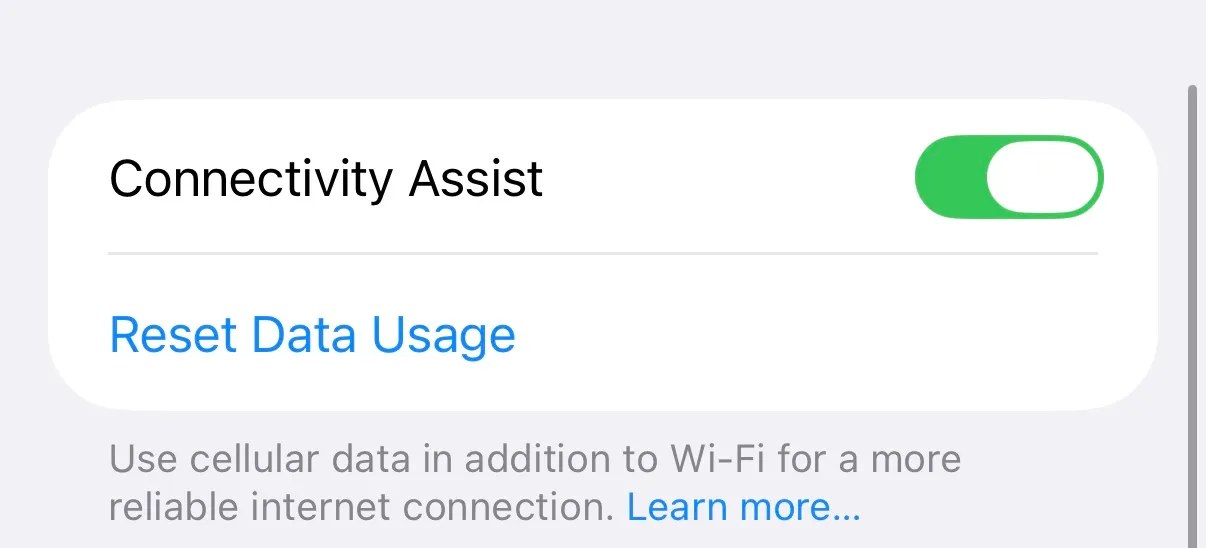
iOS 27 brings the Connectivity Assist feature, designed to keep connections from dropping when switching between Wi-Fi and cellular data. Many people don't even know the feature exists, yet it balances internet speed to deliver a better experience.
According to Apple's support document, this year's addition to iPhones uses cellular data to improve the connection when Wi-Fi slows down or becomes unusable. In other words, it bridges the two connections.
Turn on Connectivity Assist where you need it
Apple says the feature works in places where Wi-Fi tends to weaken, such as gardens, driveways, cafés, airports and gyms. It detects a weak signal and switches to cellular data.
Chance Miller, a writer at 9to5Mac, describes how, after leaving home and getting into his car, his iPhone kept clinging to the weak home Wi-Fi, making it hard to open Apple Music and Apple Maps. According to Miller, Connectivity Assist made that transition easier.

How to turn it on and off
- Open the Settings app.
- Tap Wi-Fi.
- Scroll down and turn Connectivity Assist on or off.
According to Apple, if you want to stay on Wi-Fi at all times on a particular network, you can turn the feature off for that network. The feature is not used while you are roaming abroad, when Low Data Mode is on for cellular, or in some third-party audio and video streaming apps.
When the feature is on, cellular data use may increase. You can track your usage through your carrier's app or website, or in the Settings app on your iPhone.
It works in Türkiye
In Türkiye, when I walk into a crowded place, the wireless connection my iPhone is using can sometimes be inefficient. After I turned this feature on on my iPhone 17 Pro, I was able to use Wi-Fi more efficiently.
EDİTÖR NOTU: Kaynakta talimat benzeri metin yoktu.