TechTurco WhatsApp ChannelOne-way channel: your number stays private
Apple
Hidden iPhone feature in iOS 27.2 discovered days later
The latest iOS 27.2 update released for iPhones adds a hidden and useful feature to the devices. Powered by Apple Intelligence, the feature offers convenience to users.
Contents
Apple, which released the iOS 27.2 update last month, added a hidden feature to iPhones. The technology giant integrated the "Suggested Actions" feature, powered by Apple Intelligence, into its latest Messages app.
The system analyzes incoming messages locally on the device and places one-tap action buttons directly below the message bubble.
Supports native Apple apps
The new system eliminates the need for users to copy a tracking code and paste it into a browser or manually enter a meeting time into the calendar. Artificial intelligence (AI)-powered shortcuts trigger relevant native Apple apps directly from within the message feed.
Reklam
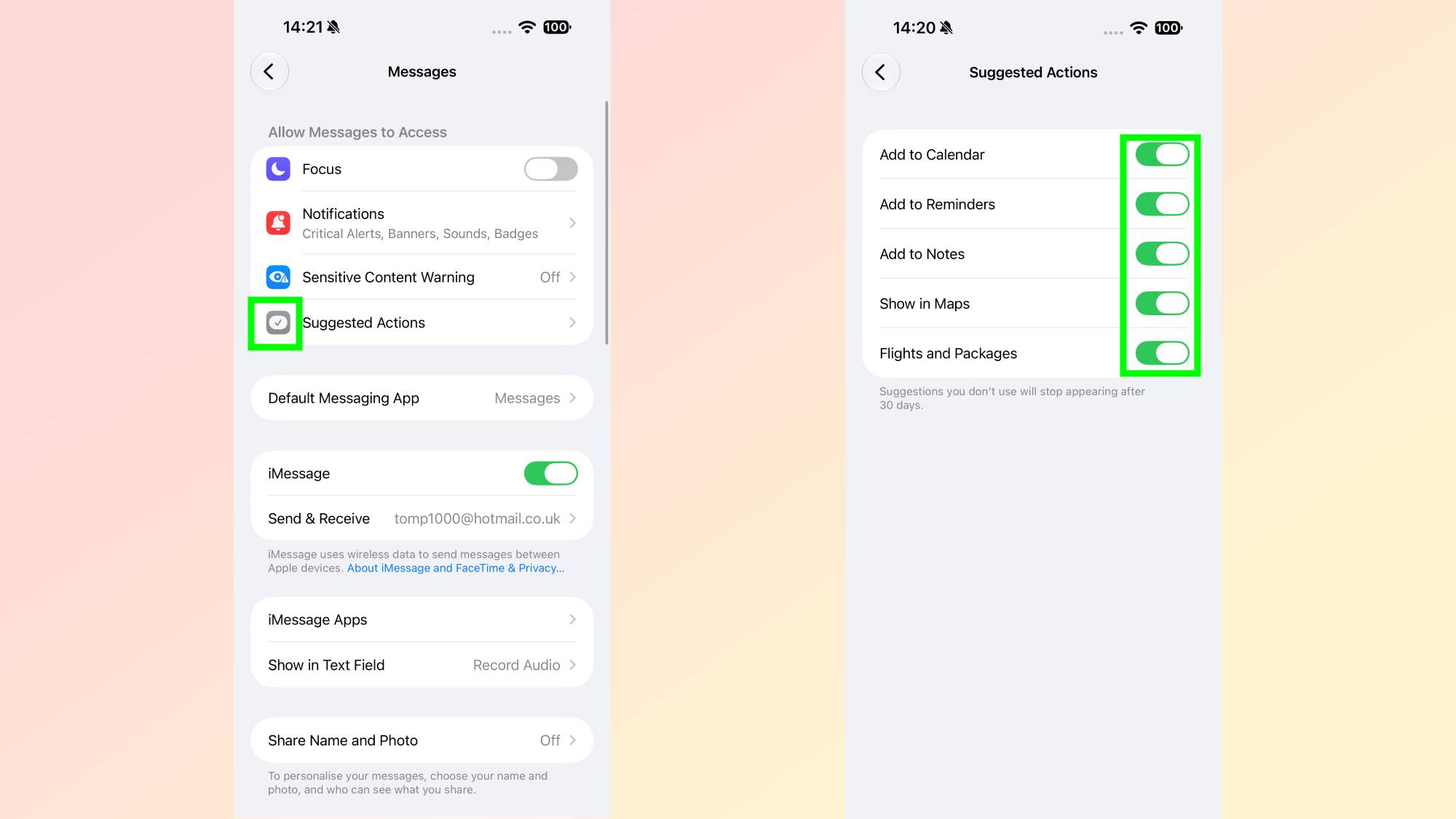

Suggested Actions Provides Automation in Five Key Areas
Enabled by default, the feature covers five basic usage scenarios commonly encountered in daily messaging:
- Calendar: When a time or dinner plan is mentioned in a message, the "Add to Calendar" button appears, offering pre-filled event details.
- Reminders: When a task or to-do item is included in a message, users can create the entry via the "Add to Reminders" button without leaving the Messages app.
- Notes: When long text blocks are detected, the system activates the "Add to Notes" shortcut.
- Maps: A direct "Show in Maps" link is generated for shared addresses.
- Flights and Cargo Packages: Flight numbers and tracking codes within messages are scanned and displayed as live status cards inside the chat screen.

Limited to iMessage and Native Apps Only
The Suggested Actions feature contains certain limitations. Action buttons appear only in blue-bubble iMessage chats between Apple users. The created shortcuts direct users exclusively to Apple's native system apps rather than third-party software.

How to Manage and Turn Off the Feature
All shortcut categories in the system become active immediately after the update. Unwanted buttons can be disabled individually via the settings menu. These preferences are configured by following these steps:
Reklam
Be the first to know
Join our channel and get key developments straight on your phone.
TechTurco Telegram ChannelMute or leave any time
- Open the device's Settings menu.
- Go to the Apps section.
- Tap Messages.
- Select the Suggested Actions tab.
- Toggle the listed Calendar, Reminders, Notes, Maps, and Flights and Packages switches on or off as desired.
Finally, Apple will release the iOS 27.2.1 update in the coming days to fix bugs and security vulnerabilities in iOS 27.2.
Reklam
This article was translated from Turkish. Read the original article in Turkish.
More in Apple